 WattDial
: your solar inverter, live, on your home Wi-Fi
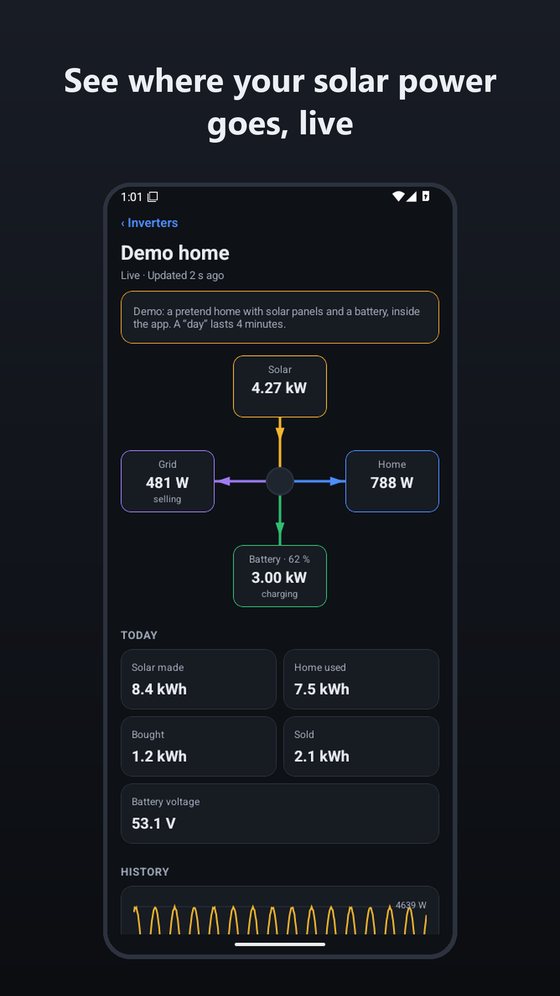
WattDial reads your solar inverter straight from your home network and shows where your power goes right now: solar, home, battery and grid. No account, no cloud, no waiting for a server.
Get WattDial on Google PlayFor Android phones · Runwith (Auto Ace LLC)
Answers to common solar monitoring problems
- Solarman app slow or offline? Read the inverter on local Wi-Fi
Why cloud solar apps lag minutes behind or show "offline", how to get the data logger back online, and how to read a Deye, Sunsynk or Sofar inverter directly on your home network. - Inverter battery % doesn't match the battery
Why a hybrid inverter can show a different battery state of charge than the battery's own BMS, and which settings and habits bring the two together. - How long will my battery last in a power cut?
A simple way to estimate how many hours a solar home battery keeps the house running during a power cut, with an example and the things that make the real time shorter. - Find the inverter's IP address and logger serial number
Where to find the serial number of a Solarman-type data logger (Deye, Sunsynk, Sofar), how to find its IP address, and how to switch on the Fronius Solar API on a GEN24.
Works with
- Solarman-type Wi-Fi/LAN data loggers (the stick on the inverter, often labelled LSW-3 or LSE-3) on Deye and Sunsynk hybrids (single- and three-phase), Deye string and micro inverters, Sofar hybrids (G3) and older Sofar string inverters
- Fronius inverters with the Fronius Solar API: Symo, Primo, Galvo, Eco and GEN24 (on GEN24 the Solar API must be switched on first)
- After you save an inverter: the battery's own BMS over Bluetooth (JK, JBD, Daly and more)
What you see
- Power flow with arrows: solar, home, battery and grid
- Battery charge (%), power, voltage and temperature where the inverter reports them
- Today's kWh: solar made, home used, bought and sold
- A chart of the last hour while the app is open
- New values every 10 seconds from a Solarman-type logger and every 5 seconds from a Fronius, while the app is open
Privacy
- Read-only: WattDial only reads your inverter and battery and never changes a setting
- No account, no sign-in, no cloud. Your readings stay on your phone
- Reading needs only your home Wi-Fi, not the internet
- Location: asked only on Android 11 and older, and only when you search for a Bluetooth battery (an Android rule). WattDial never reads your location
Honest limits
- WattDial reads only while the app is open. It does not run in the background and cannot send alerts while it is closed
- Not supported: Growatt ShineWiFi sticks, Eybond-type collectors (SmartESS), Voltronic/Axpert-type inverters (WatchPower), and other brands such as Huawei, SolarEdge, SMA or Victron
- Some newer data loggers reportedly no longer answer on the home network; those cannot be read
- This is an early version built from public technical documents. Values with only one public source are marked "unconfirmed" in the app. If your inverter is not read, press "My inverter is not read"
- The app screens are in English and Japanese
What is included and any in-app purchases are shown on the Google Play page before you install.
Questions or an inverter that is not read: support@runwith-ai.com
Get WattDial on Google Play