 WattDial
How long will my home battery last in a power cut?
The answer comes down to three numbers: how much energy is in the battery right now, how much of it the system will let you use, and how much power the house is drawing. Here is how to put them together.
The calculation
Hours ≈ usable energy (kWh) ÷ average load (kW)
- Energy in the battery now: capacity (kWh) × current state of charge. If the capacity is given in Ah, multiply by the battery voltage: 100 Ah × 51.2 V = 5.12 kWh.
- Usable part: subtract the reserve. Most systems stop discharging at a minimum state of charge (often set somewhere between 10 % and 20 %, sometimes higher as a backup reserve).
- Losses: the inverter converts the battery's DC to AC and uses some power itself while running. Taking away about 10 % is a reasonable rough allowance; your inverter's datasheet gives its efficiency and standby use.
- Average load: what the backed-up circuits draw on average, not the peak.
Example
A 10 kWh battery at 80 %, with discharge stopping at 20 %: 10 × (0.80 − 0.20) = 6 kWh usable. After about 10 % losses: about 5.4 kWh. With an average load of 0.5 kW (fridge, lights, router, a TV): 5.4 ÷ 0.5 ≈ 11 hours. With the kettle, oven or a heater running, the average rises and the time falls quickly.
What makes the real time shorter (or longer)
- Only backed-up circuits get power: many hybrid inverters supply only the circuits wired to their backup (EPS) output during a cut.
- The backup output has a power limit: often lower than the inverter's normal rating. Too much load at once can trip it.
- Fridges and pumps cycle: they draw in bursts, so watch the average over an hour, not one moment.
- Sun during the day: if the system can keep running the panels during a cut (not all can), solar can stretch the time a lot.
- The % itself may be off: if your inverter's battery % is estimated from voltage, the real energy can be more or less than shown. See why the inverter battery % may not match the battery.
- Cold batteries deliver less.
Before the next power cut
- Find out which circuits are on the backup output, and which are not.
- Check the reserve (minimum state of charge) setting with your installer: a higher reserve keeps more energy for cuts, at the cost of less daily use.
- Note your home's typical night-time load, so you can do the calculation in a minute when it matters.
- Put the router on the backup circuit if you want to check the system on your phone during a cut.
Watch the numbers live with WattDial
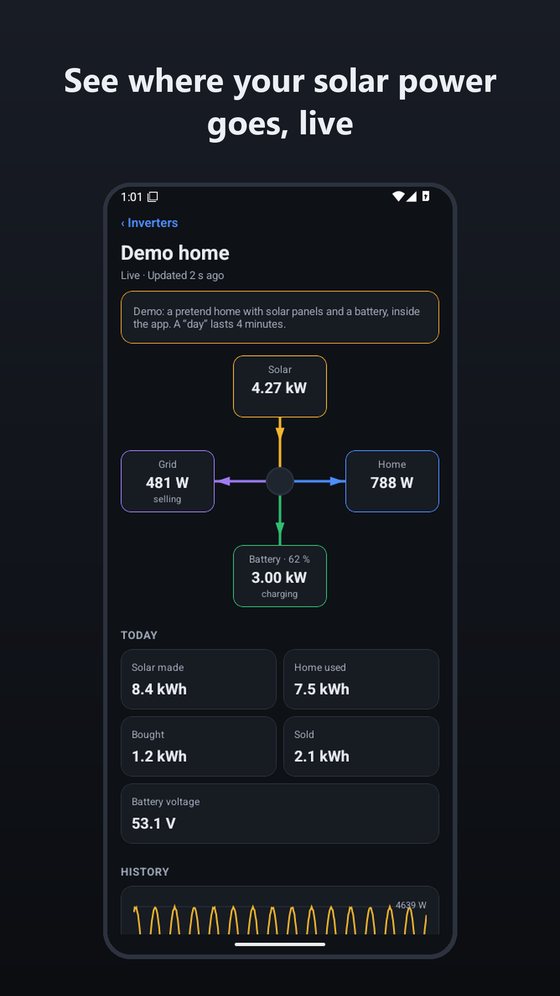
WattDial shows the battery %, the battery power and what the home is using right now, read directly from your inverter on your home Wi-Fi. WattDial does not calculate a time left for you; it gives you the live numbers to do it.
- Reading a Solarman-type logger needs only your home Wi-Fi, not the internet, so it keeps working when the internet is down, as long as the router and the logger have power.
- New values every few seconds while the app is open (it does not run in the background).
- No account, read-only.
For Android phones · Runwith (Auto Ace LLC)
Questions and answers
How many kWh does a house use at night?
It varies a lot. Read your own load at night from the inverter, or divide the night-time kWh from your meter or inverter by the number of hours.
Why did my backup stop at 20 %?
Most systems keep a minimum state of charge to protect the battery or as a reserve. The level is a setting on the inverter or battery.
Will my whole house run on the battery in a power cut?
Only if the whole house is wired to the inverter's backup output and the load stays below its power limit. Many installations back up only selected circuits.