 WattDial
Solarman app slow or offline? See your inverter on your local Wi-Fi
The app says the inverter is offline, or the numbers are minutes old while the kettle is already boiling. With Solarman-type data loggers (used by Deye, Sunsynk, Sofar and many rebadged inverters) both problems come from the same place: the data goes through a server on the internet first.
Why the cloud app lags behind
The Wi-Fi stick on the inverter collects readings and uploads them to the maker's server at intervals. Your phone then reads the server, not the inverter. Solarman's own help centre states a data update interval of 5 minutes. For a daily total that is fine; for "can I switch on the washing machine now?" it is too slow.
Why it shows "offline"
- The stick lost your Wi-Fi: a new router, a changed Wi-Fi password, or a network the stick cannot use. Most of these sticks use 2.4 GHz Wi-Fi only.
- Your internet is down: the inverter keeps working, but nothing reaches the server.
- The server or account has a problem: the app shows offline even though everything at home is fine.
- The stick hung up: it happens. Switching the inverter's communication off and on, or unplugging and replugging the stick (follow the inverter manual), often brings it back.
Getting the logger back online
- Check your router's device list: is the stick there? If not, it is not on your Wi-Fi.
- If you changed router or password, set up the stick's Wi-Fi again. These sticks usually open their own Wi-Fi network for setup (often named after the stick's serial number), with a setup page in the browser; the inverter or stick manual has the steps.
- Make sure your router offers a 2.4 GHz network the stick can join.
- If the stick is on your network but the app is still offline, the problem is between the stick and the server. Reading it locally (below) still works.
Reading the inverter directly on your home network
Many Solarman-type loggers also answer on the home network (TCP port 8899) with the "Solarman V5" protocol. Open-source projects for home automation read inverters this way. A local reading:
- is current: new values every few seconds instead of every few minutes,
- works when your internet or the server is down, as long as your home Wi-Fi works,
- needs no account: only the logger's IP address and the serial number printed on the logger.
Things to know: some newer logger firmware reportedly no longer answers on port 8899, many loggers answer only one program at a time (so close other tools that read it), and a few brands' own newer dongles do not offer local access at all. See how to find the logger's IP address and serial number.
Reading locally with WattDial
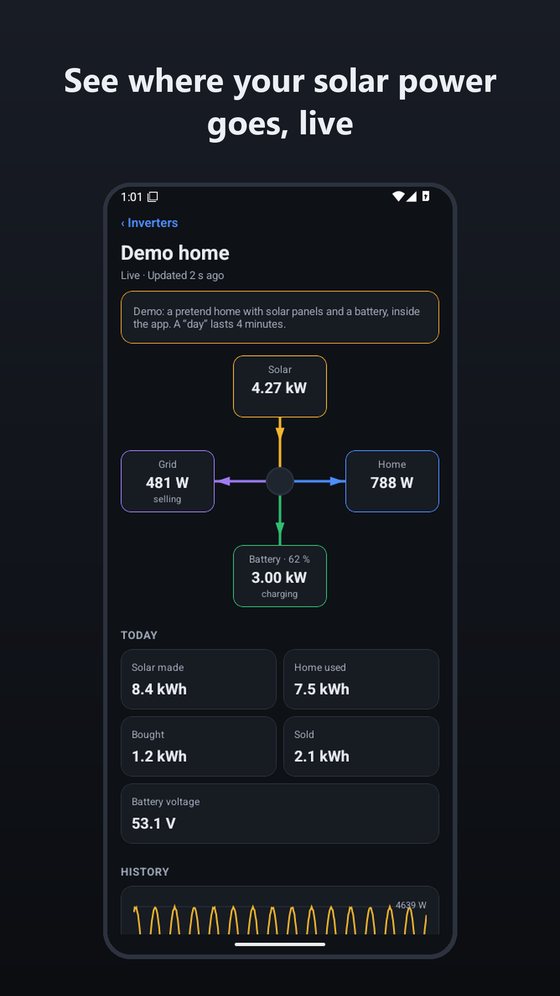
WattDial reads Solarman-type loggers on Deye and Sunsynk hybrids, Deye string and micro inverters and Sofar inverters, plus Fronius inverters, directly on your home Wi-Fi.
- Enter the logger's IP address (or tap "Find on my Wi-Fi") and the serial number from its label. No account.
- New values every 10 seconds from a Solarman-type logger, while the app is open.
- Read-only: it never changes a setting on the inverter.
- Your readings stay on your phone; reading needs no internet.
- The cloud app is still useful for history while you are away: WattDial reads only while it is open.
For Android phones · Runwith (Auto Ace LLC)
Questions and answers
How often does the Solarman app update?
Solarman's help centre states a data update interval of 5 minutes for the cloud. A local reading on your home network can be refreshed every few seconds.
Can I see my Deye inverter without internet?
Yes, if its data logger answers on your home network: a local app on the same Wi-Fi reads it directly. You need the logger's IP address and serial number.
Why does my Solarman stick not connect to my new router?
These sticks usually need a 2.4 GHz Wi-Fi network and have to be set up again after a router or password change, through their own setup Wi-Fi network.